Your finance team receives invoices and receipts in every format — PDF, scanned images, email attachments, photos from the warehouse floor. Someone opens each one, reads the supplier name, invoice number, line items, VAT and total, then types it into your ERP or spreadsheet. At 200 invoices a day, that's a full-time job that shouldn't exist.
We build automated invoice processing systems that use AI document extraction to read invoices and receipts, pull out structured data, and push it into your accounting software or Excel. When the AI isn't confident about a field — a smudged total, an unusual layout, a handwritten note — it flags it for human validation. Your team reviews exceptions instead of keying every document.
This is not a SaaS subscription. We build a custom invoice processing solution deployed on your infrastructure or ours, tailored to your suppliers, your document formats, and your accounting workflow.
Real Example: Manufacturing Company, 200 Invoices Per Day
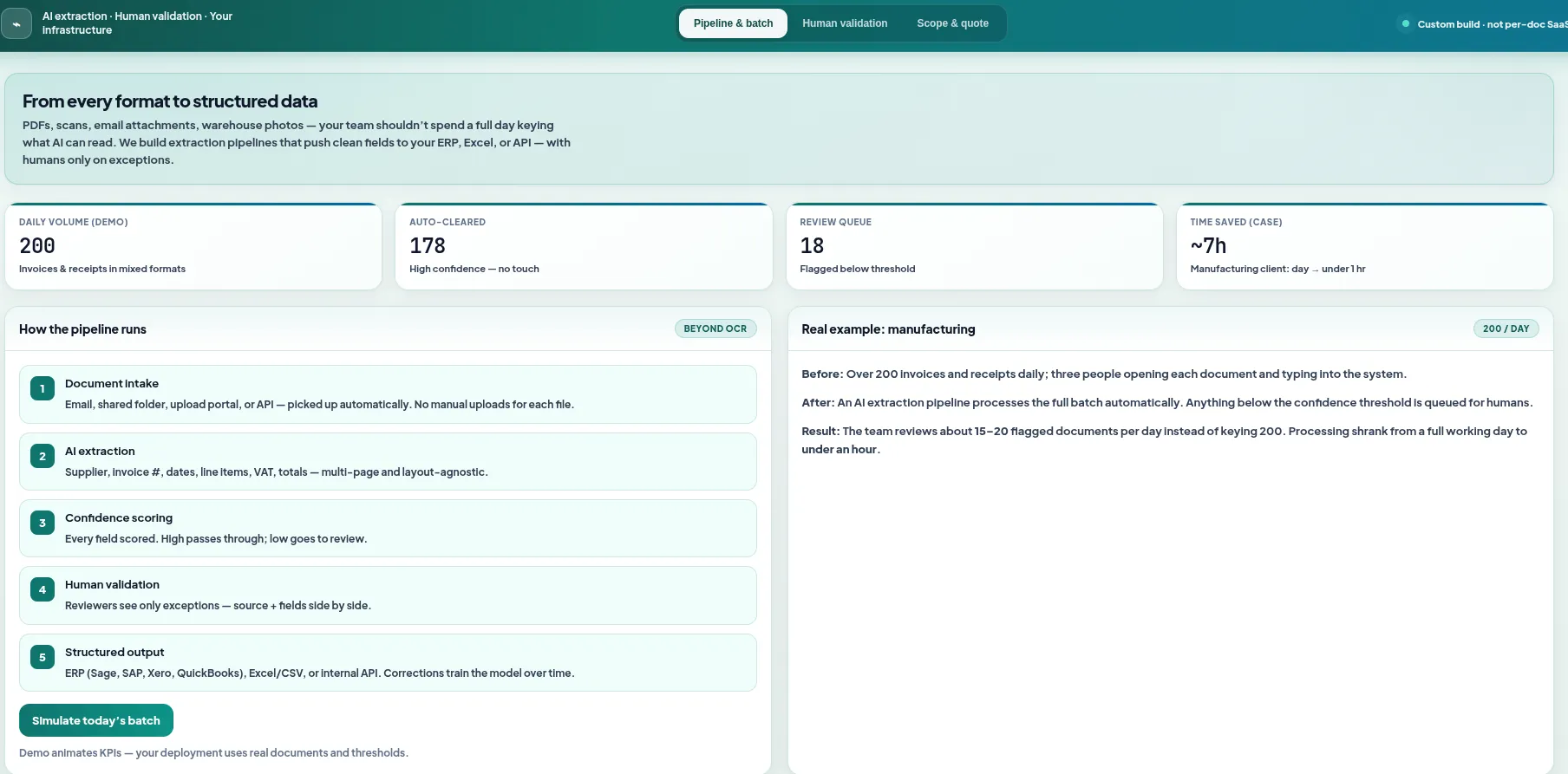
A manufacturing client was receiving over 200 invoices and receipts daily from suppliers. A team of three was dedicated to opening each document, reading it, and entering the data manually. We built an AI extraction pipeline that processes the entire daily batch automatically — with a human validation step for any document where the AI confidence score falls below threshold. The team now reviews 15–20 flagged documents per day instead of keying 200. Processing time dropped from a full working day to under an hour.
How AI Invoice Data Extraction Works
AI invoice data extraction goes beyond basic OCR. Traditional OCR reads characters on a page. Our systems understand document structure — they know where to find the invoice number, how to parse line item tables, and how to handle multi-page invoices from suppliers with completely different layouts.
The pipeline:
- Document intake: Invoices and receipts arrive via email, shared folder, upload portal or API. The system picks them up automatically — no manual uploads.
- AI extraction: The system reads each document and extracts supplier name, invoice number, date, line items, quantities, unit prices, subtotals, VAT/tax and total amount. It handles tables, multi-page invoices and varying layouts.
- Confidence scoring: Every extracted field gets a confidence score. High-confidence results pass through automatically. Low-confidence fields — blurry scans, unusual formats, handwritten annotations — are flagged for review.
- Human validation: Your team sees only the flagged documents in a review interface. They confirm or correct the AI's extraction with a single click. No need to open the original PDF — the extracted data and the source document are shown side by side.
- Structured output: Validated data is pushed to your ERP (Sage, SAP, Xero, QuickBooks), exported to Excel/CSV, or sent via API to your internal systems.
The system learns from corrections. When your team fixes an extraction, that feedback improves future accuracy for similar documents. Over time, the number of flagged documents decreases.
Example: AI invoice extraction dashboard
The Human Validation Step
Full automation sounds good in a demo. In reality, finance teams need to trust the numbers going into their ledger. That's why every system we build includes a human-in-the-loop validation step.
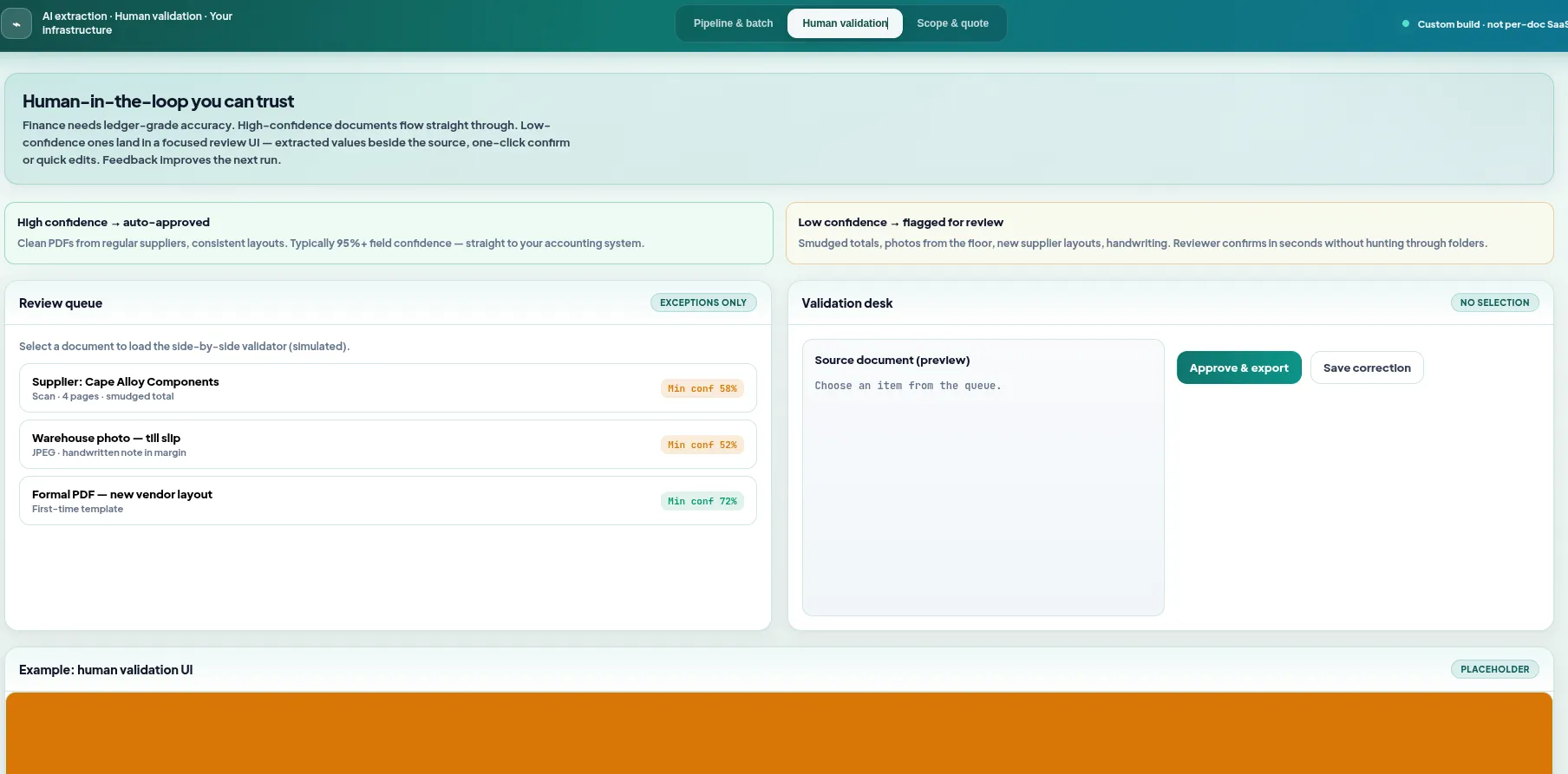
High Confidence → Auto-Approved
Clean PDFs from regular suppliers with consistent layouts. The AI extracts data with 95%+ confidence. These flow straight through to your accounting system — no human touch needed.
Low Confidence → Flagged for Review
Scanned documents, photos, handwritten receipts or new supplier formats. The AI shows what it extracted alongside the original document. Your team confirms with one click or types the correct value. Takes seconds per document.
Example: Human validation for low-confidence extractions
What Data Gets Extracted
Every invoice processing automation project is scoped to your needs, but typical extracted fields include:
- Supplier / vendor name
- Invoice number
- Invoice date and due date
- Purchase order number
- Line item descriptions
- Quantities and unit prices
- Line item totals
- Subtotal, VAT/tax, total amount
- Currency
- Payment terms
- Bank details (for payment)
- GL codes (if present on invoice)
Who This Is For
This solution is built for finance teams and accounts payable departments inside mid-size and larger businesses — the teams that process enough volume to feel the pain of manual data entry but aren't necessarily looking for a full enterprise AP platform.
- Finance teams in manufacturing: High supplier volume, mixed document quality, receipts from the floor and formal invoices from the same vendor.
- Accounts payable in retail and distribution: Hundreds of supplier invoices weekly, often with line item detail that needs to match purchase orders.
- Finance departments in professional services: Expense receipts, contractor invoices, and supplier bills across multiple entities or cost centres.
- Shared services centres: Processing invoices for multiple business units or subsidiaries, each with their own suppliers and formats.
- Accounting firms handling client AP: If you manage accounts payable for clients, this automates the data capture so your team focuses on reconciliation and advisory.
If your team spends hours each day opening PDFs and typing numbers into a spreadsheet or ERP, this is the fix.
Works Alongside Bank Statement Conversion
Many of our clients use this invoice extraction system alongside our bank statement to Excel converter. The two systems complement each other:
Invoice & Receipt Extraction
Reads supplier invoices and receipts. Extracts line items, amounts, tax and supplier details. Outputs structured data for your ERP or Excel.
This page →Bank Statement Conversion
Converts PDF bank statements to Excel. Extracts transactions from ABSA, Standard Bank, Nedbank, Capitec, FNB and others. Ready for reconciliation.
Bank statement converter →Together, your finance team gets invoices extracted and bank transactions in Excel — so reconciliation becomes matching two structured datasets instead of manually comparing PDFs against statements. Both systems feed the same accounting workflow.
If you're already using our bank statement converter, adding invoice extraction is a natural next step. Same tech stack, same deployment model, and the two systems can share a review interface.
Why Not Use an Off-the-Shelf Product?
SaaS invoice processing tools exist — Dext, AutoEntry, Vic.ai and others. They work for many businesses. But they don't work for everyone:
- Per-document pricing compounds: At 200 invoices per day, per-document SaaS fees add up fast. A custom solution has a fixed build cost and minimal ongoing cost.
- You need control over your data: Some industries and businesses can't send financial documents to third-party cloud services. A custom solution runs on your infrastructure.
- Your documents are unusual: Handwritten receipts, non-standard layouts, multi-language invoices, or industry-specific formats that generic tools struggle with.
- You need deep integration: Not just "export to CSV" but direct writes to your ERP, automatic GL coding, three-way matching against POs, or custom approval workflows.
- You want to own the system: No vendor lock-in. No subscription that increases yearly. A system you own and can modify.
Get a Quote for Invoice Processing Automation
Every project starts with a scoping call. We need to understand:
- Daily or monthly invoice and receipt volume
- Document types — formal invoices, till slips, delivery notes, expense receipts
- How documents arrive — email, scan, upload, shared folder
- What data you need extracted and where it needs to go
- Your current ERP or accounting software
We'll walk you through how the system works, show you the human validation interface, and give you a quote based on your actual documents — not a demo dataset.
Stop Keying Invoices Manually
Your finance team has better things to do than type invoice data into spreadsheets. Get a custom quote for automated invoice and receipt extraction — with human validation built in. See our AI development and automation services for more.
Get a Custom Quote