Manual takeoff on a residential or small commercial package often runs to most of a week: DWGs, elevations, roof planes, tile zones, schedules vs symbols. Automation targets measurement time so estimators spend the rest on pricing, risk and sign-off — not digitising lines.
Architects and technologists sit upstream: issued construction drawings, Revit or Archicad exports, and IFC for coordination — the same artefacts quantity surveyors and estimators measure for tenders and BOQs. This page is about measurement and extraction; if you run a practice and care more about pipeline, council submissions, fees and design stages than takeoff, see our separate write-up on project management for architecture firms — complementary to estimating workflows, not a replacement for them. For pre-submission checks against SANS and NBR (plans and specs vs. the standard), see compliance checker AI.
Typical outcome: about five days to one day
On comparable packages, first-pass takeoff often drops from roughly five working days to about one day; the rest goes to validation, RFIs and estimate build. Depends on drawing quality and how many trades you automate first.
Indicative from pilots — we baseline on your jobs in discovery.
CAD, BIM and other formats
CAD (2D)
DWG, DXF, DGN — layers, polylines, blocks and hatches give the cleanest path to areas and counts. This is still what most sites issue for trade packages.
BIM
IFC (open BIM) and model exports from Revit, Archicad, Tekla, etc. Quantities can be read from typed elements — walls, slabs, roofs, coverings — where the model is structured and LOD is consistent. Incomplete or multi-discipline merges still need QS sense-checks.
Other
PDF (vector or scanned), plot outputs, and occasional DWF / viewer exports. Raster scans cost more to verify than vector CAD or BIM. Point clouds and specialist formats are scoped separately if needed.
What we extract (geometry-driven)
Regardless of whether the source is CAD, BIM or PDF, the pipeline aims at measurable truth — not a screenshot guess:
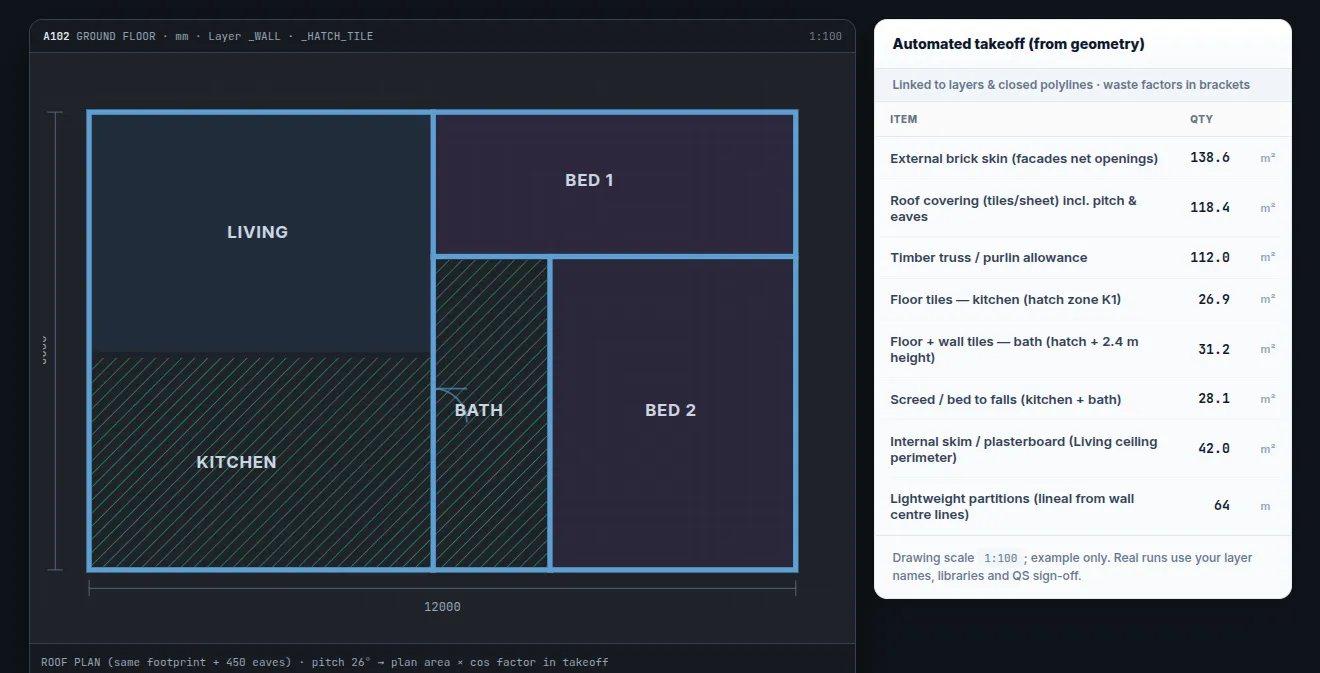
- Layers & boundaries / elements: in 2D CAD — finishes vs structure; closed polygons for rooms, roofs, paving. In BIM — element categories and quantities tied to types and materials where the model supports it.
- Hatches & schedules: map patterns to your library; cross-check door/window tables to plan symbols (2D) or schedule data (BIM).
- Heights & scale: sections/elevations and title blocks — brick courses, facades, parapets; correct units.
- Raster PDFs: vision-assisted where needed — higher review cost; vector CAD, BIM or searchable PDF is cheaper to run.
CAD → takeoff → BOQ / Excel
From issued drawings or models through automated measurement to structured quantities your estimators can review and export.
Outputs
Examples (with your waste factors and libraries): tiles and screeds (m²), roof coverage (incl. pitch rules where defined), brick skins, waterproofing, paving, earthworks where bounded, lintels and openings from schedules — export to CSV, Excel or your BOQ template.
A lead QS still approves quantities before tender; the system flags weak matches (messy layers, revision clashes, schedule conflicts).
What we need to quote
- Sample CAD, BIM (e.g. IFC) or PDF and phase-one trade packages
- BOQ or Excel templates and naming
- Libraries: tile sizes, roof products, bricks, wastage %
- Revision diff if drawings churn
- Hosting preference (on-prem / cloud) and handoff to estimating or ERP
- Build path: AI development for deployment; automation for pushing files into downstream tools
Demo, pilot, licence
We run a demo on sample or anonymised drawings, then a scoped pilot with success criteria. Pricing follows seats, volume and support — contact us to book or discuss buying / licensing.
Book a demo Request pricing